You leave a meeting with six half-sentences, three names, two dates, and one note that just says “follow up.” It all made perfect sense when you wrote it. Twenty minutes later, it looks like evidence recovered from a minor crime scene.
AI meeting notes can be useful, but a polished summary isn’t the goal. What you actually need is a checkable list of decisions, action items, owners, deadlines, and anything that still needs clarification.
This is exactly the kind of boring job AI can help with.
But don’t just ask it to summarize the meeting. A tidy paragraph describing what everybody discussed may look impressive while doing almost nothing to answer the question that matters afterward:
Who is doing what, by when, and what still needs to be figured out?
A better approach is to have AI turn your rough notes into a draft action record: decisions, action items, owners, stated due dates, and unresolved questions. Then you check the important parts before anybody treats it as reality.
That last step matters. AI is perfectly capable of producing something that looks organized, confident, and completely reasonable while attaching an action to the wrong person or filling in a detail your notes never established. Very professional-looking nonsense is still nonsense.
Before you paste your meeting notes anywhere
First, look at what is actually in them.
Meeting notes can contain customer information, employee details, internal plans, financial information, credentials, personal information, or other material that shouldn’t casually be dropped into an AI tool.
If the notes contain sensitive information, stop and decide whether that material should be entered into the AI service you’re using at all. Remove unnecessary sensitive details when you can and follow whatever rules apply to your workplace or organization.
For the fuller version of this particular buzzkill, see What Not to Put Into ChatGPT or Another AI Tool.
Once the notes are appropriate to use, don’t clean them up just to make them pretty. Rough notes are fine. Missing information is the bigger problem, and formatting them into lovely bullet points won’t magically create facts that aren’t there.
Use this workflow instead
Source → Extract → Flag uncertainty → Verify → Share
- Source
Give the AI the actual material it should work from: your notes, relevant meeting context, and the attendee names or roles when those help clarify who is being discussed.
The important idea is simple: give it something to work from instead of asking it to reconstruct the meeting from hints and vibes. - Extract
Tell it exactly what to pull out:- decisions that were clearly made
- action items
- owners when the notes establish them
- due dates when the notes state them
- unresolved questions or follow-ups
- Flag uncertainty
This is the part most people skip.
Tell the AI not to infer missing information.
If the notes don’t establish an owner, the output should say Not stated.
If nobody actually gave a deadline, the due date should say Not stated.
If something sounds like a decision but the notes don’t make that clear, mark it Needs verification.
That is much more useful than letting the AI quietly fill the gaps with something plausible. Plausible is lovely for dinner suggestions. It’s less charming when it assigns Janet a Friday deadline Janet never agreed to. - Verify
Now check the output against your original notes and, where appropriate, your own recollection of the meeting.
Pay particular attention to who owns each action, deadlines, decisions that supposedly became final, and anything marked ambiguous or needing verification.
AI can help organize the source material, but the generated action list should remain a draft until a person checks it. - Share
Only after that verification should the cleaned-up action list become the thing you email, paste into a project system, or treat as the meeting record.
The machine gets to sort the mess. It does not get promoted to keeper of organizational truth because it made a handsome table.
Give AI a better instruction
Review the meeting notes below and create a draft action record.
Extract only information supported by the notes.
Identify:
- Decisions that were clearly made
- Action items
- The person responsible, only when stated or unambiguous
- Due dates, only when explicitly stated
- Open questions or unresolved issues
Do not invent or infer missing owners, deadlines, decisions, or details. Write “Not stated” when information is missing. Mark anything ambiguous as “Needs verification.”
Format the result as a table with:
Type | Item | Owner | Due Date | Evidence from Notes | Status
After the table, list anything that needs clarification before this is shared.
Meeting context: [purpose]
Attendees: [names and roles]
Notes:
[paste notes]
Notice what this instruction does not contain: magic words, elaborate prompt theater, or a declaration that the AI is now a world-class meeting productivity guru with 37 years of imaginary experience.
It gives the tool a job, context, rules, and an output format. That’s usually far more useful.
What good output looks like
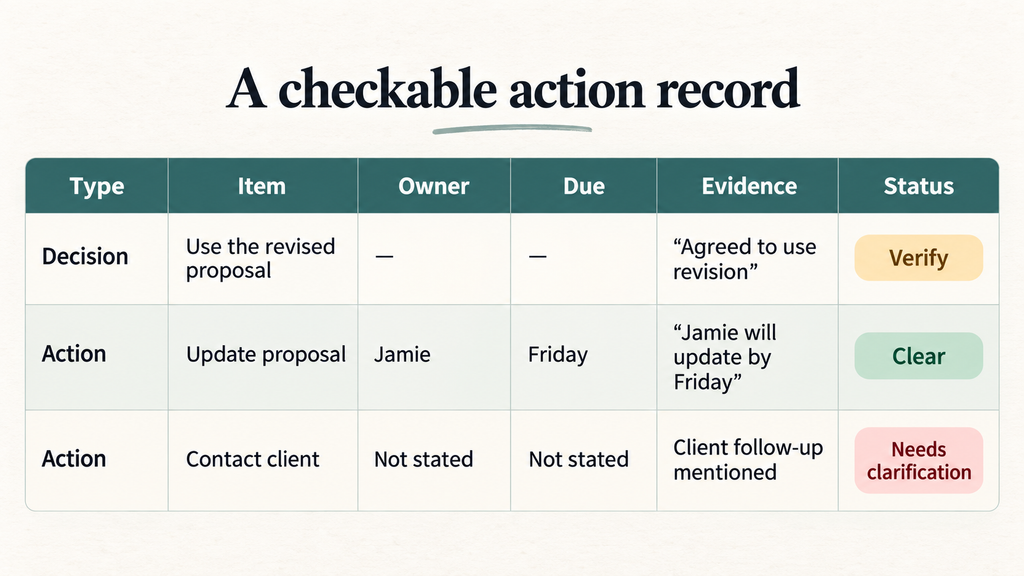
A useful action record separates decisions and actions, shows an owner and due date only when the notes support them, includes a short piece of source evidence, and marks uncertainty clearly.
For example:
Open questions:
- Who owns the client follow-up?
- Was Friday an agreed deadline or merely discussed?
- Was the proposal change actually approved?
The Evidence from Notes field is particularly useful. It gives you something to check instead of forcing you to reverse-engineer why the AI reached a conclusion.
What if your notes are incomplete?
Then the output should be incomplete too.
That’s not failure. That’s an honest representation of the source material.
AI can help organize rough or fragmented notes, but it cannot reliably recover information that was never captured. If nobody wrote down who owned an action, asking the model to identify the owner doesn’t make that information suddenly exist.
Use Not stated. Put the uncertainty into Open questions. Ask a human.
Boring? Certainly. Also considerably better than discovering three days later that everyone thought someone else was handling it.
Make this reusable
Once the workflow works for you, save the instruction as a reusable template.
For each new meeting, replace the meeting purpose, attendee names and roles, and the raw notes.
You can also adjust the output for your actual workflow. Maybe you need a Priority column. Maybe you want open questions separated from actions. Maybe you want the final verified list formatted for your project-management system.
That’s the useful lesson behind Better Instructions Beat Better Prompts: improve the job description and output requirements instead of hunting for a secret phrase that supposedly unlocks the AI’s hidden genius.
The point isn’t better meeting summaries
The point is leaving a meeting with something you can actually use.
AI can help turn rough notes into a structured draft. It can sort decisions, actions, names, dates, and unresolved questions into a format that’s easier to review.
But missing information should stay missing, uncertain information should look uncertain, and the important details should still be checked by a human before they’re shared.
Use AI for the boring sorting work. Keep responsibility for what becomes the record.
Want more practical AI workflows without the hype? Get the newsletter.
Frequently Asked Questions
Can AI accurately assign meeting action items to the right person?
It can identify owners when the source notes make ownership clear, but ambiguous notes can lead to misattribution. Give it useful attendee context, tell it not to infer missing owners, and verify assignments before sharing the list.
What if my notes are really messy or incomplete?
Start with the rough notes. Missing or ambiguous information limits what the model can recover reliably, so owners, dates, or decisions that aren’t established should remain marked as missing or needing verification.
Should I trust the due dates it produces?
Treat a due date as usable only when it is supported by the notes and survives your review. If the notes don’t state a deadline, instruct the AI to return Not stated rather than invent one.
Can I reuse this for every meeting?
The workflow is reusable, but the result still depends on the quality and completeness of the source notes. Save the instruction as a template, swap in the new meeting context and notes, and keep the verification step.