

If you’ve been looking for a way to change what Facebook shows you, you’ve probably already tried tapping “Not interested” and watching the same kind of post come back.
Meta now has something new to try. On October 13, 2026, it announced a feature called Your algorithm, which lets you tell Facebook in your own words what you want more or less of in Feed and Reels. Meta calls it AI-powered. In practice it is a list of topics Facebook has already decided you like, plus an Add button. It may still be a useful one.
This guide covers where to find it, how to use it, what to do if it hasn’t reached your account, and what Meta hasn’t said yet. It sticks to what Meta has announced and what outside reporters have confirmed.
What Meta actually announced
Meta says Your algorithm is a place to add and manage the topics you want to see in Feed and Reels, using your own words. You reach it from the three-dot menu on a post.
Meta also says that when you tap Interested or Not interested on a post, Facebook may ask a follow-up question. You can answer in your own words.
Behind the scenes, Meta says large language models (the same kind of AI that powers chatbots) read what you type. Meta says Facebook then combines your words with what it already tracks, such as the posts you like and comment on and what you watch. In Meta’s description, your typed topics work alongside those existing signals, not in place of them.
Meta also says your recommendations respond right away, within the same session. That is Meta’s claim, and we come back to it below.
For context, TechCrunch reports that the feature launched first on Instagram, and that Threads has a similar one called Dear Algo.
How to find and use Your algorithm
We checked these steps in the Facebook iPhone app on October 29, 2026. The option wasn’t showing on the desktop website for our account that day, and menu wording and layout can differ between phones and computers.
- Open Facebook and go to any post in your Feed, or open a Reel.
- Tap the three dots in the corner of the post.
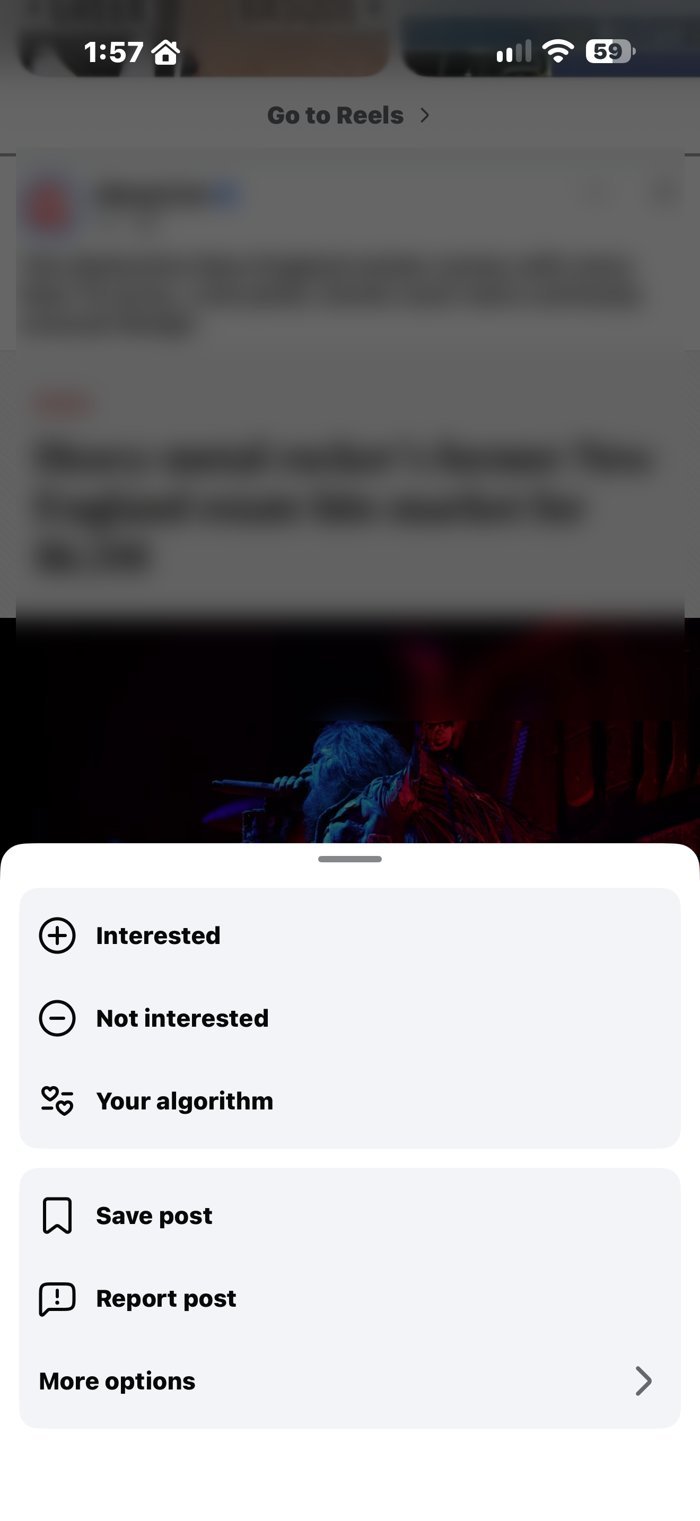
- Tap Your algorithm. On our iPhone it sat just below Interested and Not interested. If it isn’t there, skip to the next section.
- Look over what Facebook thinks you’re into. The page opens with a one-line summary, then an Interested in list that Facebook says is based on your recent activity and summarized by AI. Tap Add under Interested in for topics you want more of, and Add under Not interested in for topics you want less of. Topics with a pencil icon can be edited. Short and specific beats a long list of complaints.

- Go back to your Feed and Reels and look again after a few minutes, then after a few days. Edit your topics whenever your interests change.
There is a second route. On any post, tap Interested or Not interested. If Facebook asks a follow-up question, answer it in a few words.
Example topics (our suggestion, not Meta’s)
Meta hasn’t said which wording works best. Plain topics are a sensible place to start.
- More: easy weeknight dinners, local hiking, woodworking projects
- Less: celebrity gossip, outrage videos
What if you don’t see it?
Meta says it is rolling the feature out. Its announcement doesn’t give a schedule by country, language or app version. Not seeing it yet doesn’t mean you did anything wrong.
- Check the three-dot menu on a few different posts, in both Feed and Reels.
- Update the Facebook app. Meta hasn’t said the app version matters, but it is a reasonable thing to try.
- Check again in a few days.
- In the meantime, the older controls still work (next section).
How it differs from the older controls
Techlicious reports that Facebook’s older tools are still there:
- The X on a post tells Facebook to show fewer posts like it.
- Snooze pauses suggested posts in your Feed for 30 days.
- Favorites lets you pick accounts you follow so you don’t miss their posts.
Techlicious notes that, until now, Facebook’s controls worked on one post or account at a time. Your algorithm is built for topics, in your own words.
When I tried it on my own account, it seemed very similar to the Interested and Not interested system Facebook already had, with a text box added. Meta ties the two together: the follow-up questions after those buttons are part of the same announcement. Whether typing a sentence does more than tapping a button is the part we haven’t seen anyone test independently.
If a menu name doesn’t match what you see, check Facebook’s Help Center, since names change.
Where this can go wrong, and how to check
Meta says changes show up in the same session. It hasn’t published how much weight your typed topics get compared with everything else Facebook tracks. As of October 29, 2026, we haven’t found independent testing of how much the controls change what people see.
“AI-powered” describes how the feature is built. It does not describe whether the feature works.
On October 29, I changed some of the topics in my own Your algorithm settings. I’ll update this post after a week with what I notice.
So treat it as worth trying, not as a guarantee. Here is a simple way to check:
- Scroll your Feed and Reels the way you normally do for a few minutes after you add your topics.
- Do it again a day later, and again a week later.
- Ask one question: is there less of what I said I wanted less of?
- If not, edit your topics and make them more specific, or fall back on the older controls above.
A sensible privacy habit
Meta’s announcement doesn’t say where the topics you type are stored or how long they are kept. It doesn’t say whether they are shared or whether they help train Meta’s AI. It also doesn’t say whether you can turn the feature off. Techlicious points out the same gaps.
One more thing worth noticing: the page opens with Facebook’s own AI summary of what it thinks you’re into, built from your activity. Read it. It is a fair preview of what Facebook has already worked out about you without being asked.
Until Meta says more, here is a cautious habit: type only topics you would be comfortable having tied to your account. Cooking, hiking and home repair are low-stakes. Health conditions, money troubles and family details are better left out.
It is the same rule we use for chatbots in What Not to Put Into ChatGPT or Another AI Tool: if the tool doesn’t need it to do the job, don’t give it.
The short version
Facebook now has a place to tell it what you want in plain words, and Meta says it responds right away. Try it, check the results yourself, and keep the older controls handy.
Facebook has installed a suggestion box. Whether it does much is the part we haven’t seen anyone test independently.
Frequently Asked Questions
Where is Your algorithm on Facebook?
According to Meta, it is in the three-dot menu on posts in Feed and Reels. We found it there in the Facebook iPhone app. If you don’t see it, check the app as well as the website. It may not have reached your account yet.
Is Your algorithm available to everyone?
Meta says it is rolling out but hasn’t published a schedule by country, language or app version.
Can I turn Your algorithm off?
Meta’s announcement doesn’t say whether the feature can be turned off. It does say you can add and manage the topics you list.
Does Facebook still use what I like and watch?
According to Meta, yes. It says it combines your typed topics with signals such as the posts you like and comment on and what you watch.
Does it work on Reels as well as Feed?
Meta says it applies to both Feed and Reels.